Plasticity
 Manual
ユーザーサポートユーザーサポート
GitHubGitHub (opens in a new tab)
  • 新機能
  • コマンド一覧とショートカットキー
    • Plasticityの基本
    • スケッチとプリミティブツール
    • 共通コマンド
    • スケッチコマンド
    • ソリッドコマンド
    • ショートカットキー一覧 (PDF)
  • 移行ガイド: v26.1
  • はじめに
  • スタートガイド
    • ライセンスタイプと主な機能
    • ダウンロードとインストール
    • ユーザーサポート
  • Plasticity の基本
    • User Interface
      • オブジェクトタイプ
      • 3Dビューポートの操作
      • ユーザーインターフェース概要
      • Pメニュー
      • 設定
      • アウトライナー
      • アセット
      • オブジェクトをグループ化
      • オブジェクトの状態を切り替え
      • オブジェクトのフォーカスと分離
      • 選択モード
      • オブジェクトの選択
      • シェーダーモード
      • カメラ設定
      • 表示モード
      • ビューキューブ
      • グリッドと単位
      • スナップ
      • 作業平面
      • コマンドバー
      • コマンドパレット
      • ラジアルメニュー
      • 一般機能
      • インポート/エクスポート
      • 参照画像のインポート
      • OBJのエクスポート
      • Curvature
      • materials
    • Constraint System
    • Working with Objects
    • Object Types
    • Group Objects
    • Selecting Objects
    • Toggle Object States
    • Focus and Isolate Objects
    • Viewport and Display
    • Operating the 3D Viewport
    • Render Mode
    • Preferences and Tools
    • Preferences
    • Radial Menu
    • General Functions
    • Import and Export
    • Import/Export
    • Importing Reference Images
    • Export OBJ
    • Export SVG
    • Export Hidden Line
  • CAD の基本
    • UVN座標系
    • カーブとサーフェスの連続性
    • スプラインを使用してクラスAサーフェスを作成する方法
    • フィレットの操作順序
    • nurbs-overview
  • ツール
  • スケッチ・プリミティブツール
    • スケッチの基本
    • Line
    • Spline Curve
    • Control Point Curve
    • Center Circle
    • Two Point Circle
    • Three Point Circle
    • Tangent Circle
    • Center Point Arc
    • Three Point Arc
    • Tangent Arc
    • Regular Polygon
    • Spiral
    • Corner Rectangle
    • Center Rectangle
    • Three Point Rectangle
    • Bridge Curve
    • Trim
    • Split Curve At Point
    • Insert CV At Point
    • Sphere
    • Corner Box
    • Center Box
    • Three Point Box
    • Cylinder
    • Ellipse
    • Measure
    • Measure Continuity
    • Measure Radius
    • Toggle Curvature
  • コマンド
  • 共通
    • Complete Edge
    • Copy with Placement
    • Curve Array
    • Dimension
    • Duplicate
    • Fork Material
    • Measure
    • Mirror
    • Move
    • Paste with Placement
    • Place
    • Publish to Plasticity Share
    • Radial Array
    • Rectangular Array
    • Remove Material
    • Rotate
    • Scale
    • Section Analysis
    • Set Material
    • Subdivide
  • スケッチ
    • ブリッジと接続
    • Bridge
    • Bridge Curve
    • Bridge Edge
    • Bridge Vertex
    • カットとトリム
    • Cut Curve
    • Trim
    • Split Segment
    • 変形とスライド
    • Deform
    • Deform Curve
    • Slide
    • Slide Curve CV
    • 整列
    • Edge Align
    • Vertex Align
    • 延長
    • Extend
    • Extend Curve
    • フィレット
    • Fillet
    • Fillet Curve
    • Fillet Vertex
    • 結合と分離
    • Join
    • Join Curves
    • Unjoin
    • Unjoin Curve
    • オフセット
    • Offset Curve
    • Offset Planar Curve
    • Offset Region
    • Offset Vertex
    • Slot
    • 投影
    • Project
    • Project Body Body
    • Project Curve Body
    • Project Curve Curve
    • Project Outline
    • Alternative Duplicate
    • Duplicate Curve and Project
    • Create Outline
    • 再構築とリファイン
    • Convert Vertex
    • Delete Redundant Topology
    • Insert Knot
    • Raise Curve Degree
    • Raise Degree
    • Rebuild
    • Rebuild Curve
    • Reverse
    • Reverse Curve
    • インスタンス
    • Create Instance
    • Create Curve Instance
    • Realize Instances
    • Realize Curve Instances
    • テキスト
    • Text
    • 表示と解析
    • Toggle Curve Curvature
    • Toggle Points
  • ソリッド
    • ブールとカット
    • Boolean
    • Cut
    • 作成と複製
    • Alternative Duplicate
    • Create Instance
    • Create Solid and Sheet Instance
    • Realize Instances
    • Realize Solid and Sheet Instances
    • サーフェス作成
    • Bridge Surface
    • Constrained Surface
    • Extrude
    • Loft
    • Patch
    • Pipe
    • PolySplines
    • Revolve
    • Square
    • Sweep
    • Xnurbs
    • 変形とスライド
    • Deform
    • Deform Solid and Sheet
    • Slide
    • Slide Surface CV
    • 削除と除去
    • Delete Face
    • Delete Redundant Topology
    • Remove Fillets from Shell
    • Remove Nominal Surface
    • ドラフトとアライン
    • Edge Align
    • Surface Align
    • Project Align
    • Draft Face
    • 延長
    • Extend
    • Extend Sheet
    • フィレット
    • Fillet
    • Fillet Shell
    • 中空化と肉厚化
    • Hollow
    • Thicken
    • Thicken Face
    • インプリント
    • Imprint
    • Imprint Body Body
    • Imprint Curve Body
    • 結合と分離
    • Join
    • Join Sheets
    • Unjoin
    • Unjoin Faces
    • Unjoin Shells
    • オフセット
    • Offset Curve
    • Offset Edge
    • Offset Face
    • Offset Face Loop
    • 再構築とリファイン
    • Isoparam
    • Match Face
    • Raise Degree
    • Raise Surface Degree
    • Rebuild
    • Rebuild Face
    • Reverse
    • Reverse Sheet
    • トリムとアンラップ
    • Untrim
    • Unwrap Face
    • 表示と解析
    • Find Boundary Edges
    • Toggle Surface Curvature
  • 連携
  • Blender
    • Blenderブリッジの紹介
    • Blender Bridgeのセットアップ
    • 使用方法
    • Blender Bridge FAQ
  • Cinema 4D
    • Cinema 4D Bridgeの紹介
    • Cinema 4D Bridgeのセットアップ
    • 使用方法
    • Cinema 4D Bridge FAQ
  • 変更履歴
  • リリースノート
    • Whats New 1 3
    • Whats New 1 4
    • Whats New 2024.1
    • Whats New 2024.2
    • Whats New 2025.1
    • Whats New 2025.2
    • Whats New 2025.3
    • Whats New 2026.1
    • whats-new-2026.2
Question? Give us feedback → (opens in a new tab)
Plasticity の基本
Plasticity Interface
ユーザーインターフェース概要

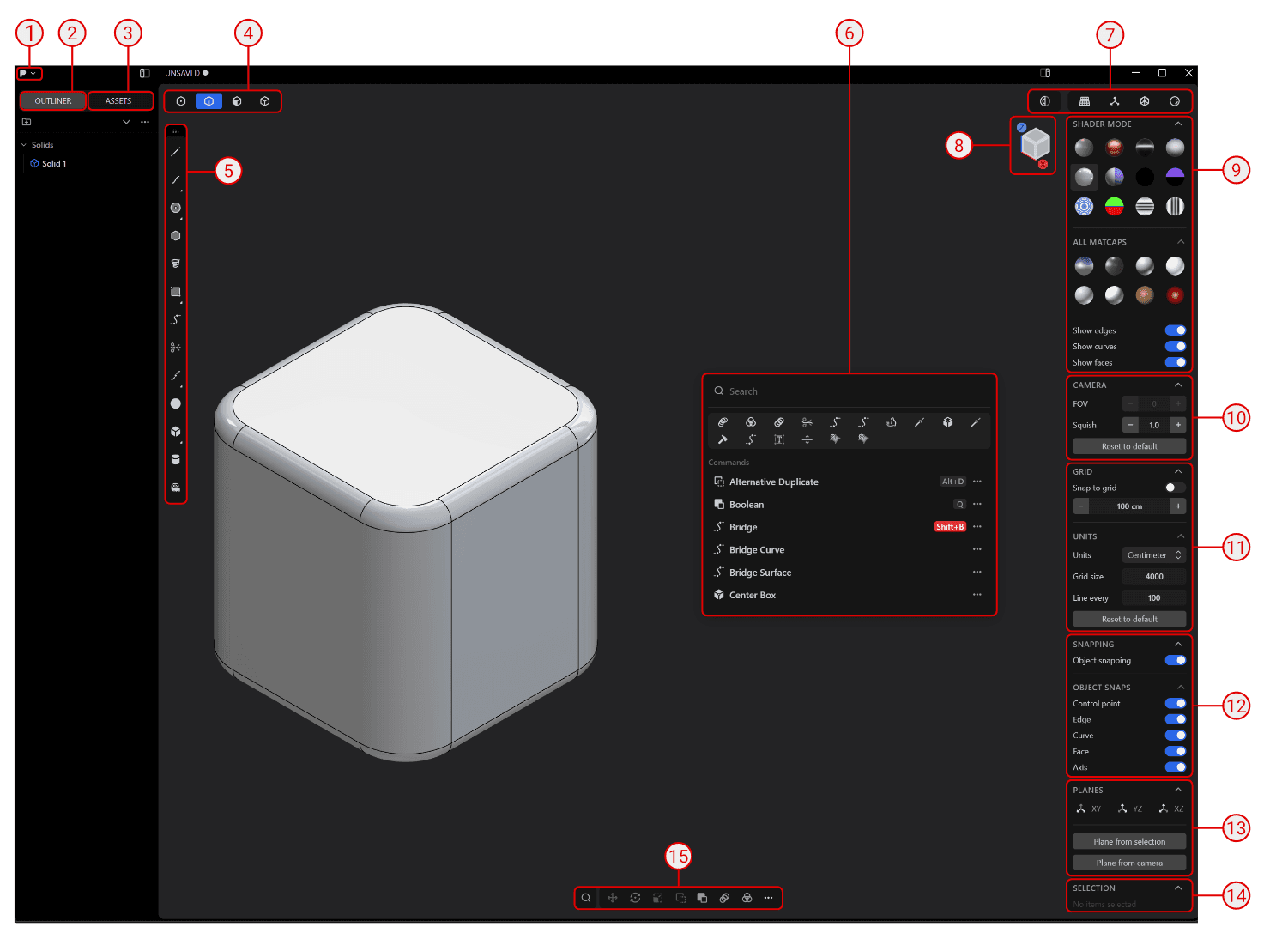
ユーザーインターフェースの概要

Interface

  1. Pメニュー
  2. アウトライナー
  3. アセット
  4. 選択モード
  5. ツール
  6. コマンドパレット
  7. 表示モード
  8. ビューキューブ
  9. シェーダーモード
  10. カメラ設定
  11. グリッドと単位
  12. スナップ
  13. 平面
  14. 選択
  15. コマンドバー
3Dビューポートの操作Pメニュー

English | Deutsch | 日本語
© Copyright 2026. All rights reserved.