Offset Edge
CommandOffset Curve
ShortcutO
Button In Suggested Commands Menu
In Suggested Commands MenuAvailable in
IndieStudio
Description
Offset the selected Edges by specifying the distance to create new Edges. The option for symmetrical offsetting on both sides is available.
Basic Usage
- Select the Edges you want to offset.
- Press O.
- Move the mouse left and right to specify the direction and distance.
- Set the options in the Command Dialog and Keyboard Shortcuts.
-
Command Dialog
- Distance: Specify the distance.
-
Keyboard Shortcuts
- V Gap fill:
- Round: Fills convex corners with a rounded curve.
- Linear: Fills convex corners with straight lines, but the resulting edges may be fragmented rather than continuous.
- Natural: Fills convex corners with straight lines while maintaining continuous edges.
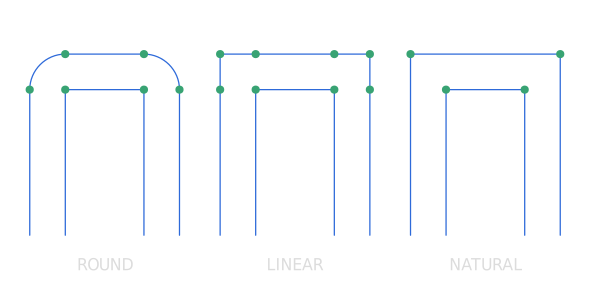
- S Lock distances: Offset with equal distance on both sides.
- V Gap fill: Cycle through gap fill options.
- D Distance: Specify the distance with mouse movement.
- V Gap fill:
-
Command Dialog
- Confirm with OK in the Command Dialog or right-click.