Project Curve Curve
CommandProject
ShortcutI
Button In Suggested Commands Menu
In Suggested Commands MenuAvailable in
IndieStudio
Description
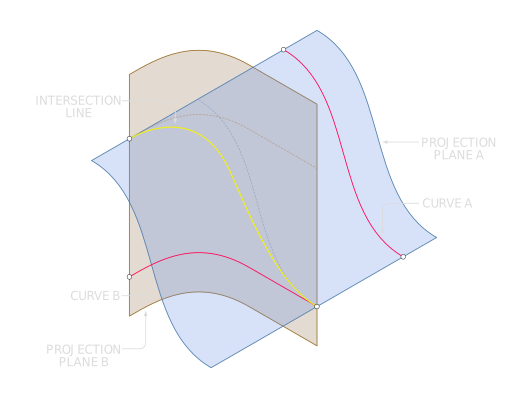
Create a new curve by projecting the intersection points of the surfaces generated from two independent curves. The projection algorithm follows the normal behavior of each input curve, ultimately producing the intersecting curve. Because the resulting line inherits the characteristics of both original curves, it enables advanced construction of lines in 3D space.
💡
Note: Projecting curves can occasionally produce unexpected results or errors, often because the normal direction isn't set correctly. If this happens, try manually extruding each curve along its intended direction and then imprinting a line - Imprint Body Body. This approach usually yields more reliable results in complex situations.
Basic Usage
- Select the two Curves to be projected.
- Press I or click the button.
- The projected intersection Curve will be created.