Snap
Mesh and Image Snap
-
You can use limited snapping features on respective Meshes and Images.
Type Snap target Tip help Mesh (OBJ, STL, FBX, 3MF) Vertex/Face Vertex/Face Image (.PNG, .JPG, .JPEG) Corner Corner
Object Snap
-
- You can use snapping to snap your cursor to features while drawing or moving objects.
-
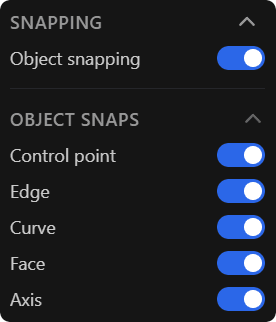
- To toggle the object snapping, click the toggle button in the "Snapping" window located on the right sidebar. To toggle different types of snapping, click on "Object Snaps" section window and adjust the options.
-
- To temporarily enable snapping, hold the Ctrl key. Snapping is automatically enabled when drawing Curves.
-
- To temporarily disable snapping, press Shift + X key. This will allow you to temporarily disable different types of snaps if you are currently locked onto one. You can repeatedly press the button until you reached the desired snap type.
-
- You can snap to points on various types of objects: Control-Vertex, Curve, Region, Edge, Face, Measurement, and Section. A snap target appears as a small black dot.
-
- Objects instanced with the Create Instance command support all of these snap points too.
-
- Tip help appears when you point to a snap target. Click when the tip help is visible to snap accurately.
Snap target Tip help Control-Vertex CV Curve Curve, Beginning, End, Middle, Closest, Intersection, X, Y, Z, XY, YZ, ZX, Center, 1/4, 3/4, Perpendicular, Tangent, Tan/Tan, Section Region Region, Center Edge Edge, End, Middle, YZ, XZ, Section Face Face, Center Measurement Point Measurement Section Section -
You can execute the object snapping in the Command Palette; Toggle object snapping.
Plane and Section Snaps
Section plane snap
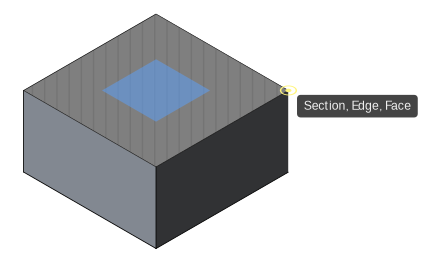
- Snaps to the point where an edge or curve intersects the active section plane.
- The tip help shows the plane and the host entity, for example
Section,Edge. - Use this to place points exactly where a cut passes through your geometry.
YZ / XZ plane snap
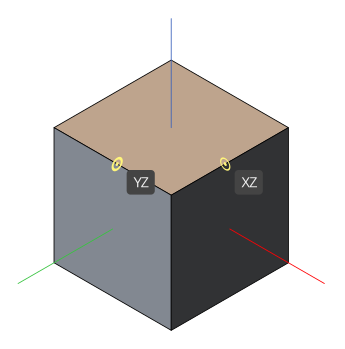
- Snaps to the point where an edge or curve intersects the YZ or XZ plane.
- Previously, snaps were only available where an edge or curve crossed the X, Y or Z axes. These now extend into 3D, so the snap works on the full plane rather than only on the axis line.
- The tip help lists the plane followed by the entity it was found on, for example
YZ,Edge,Face.
Sketch Tips
- To draw a sketch accurately, please refer to Sketching Tips.