Extend Sheet
CommandExtend
Shortcut—
Button In Suggested Commands Menu
In Suggested Commands MenuAvailable in
IndieStudio
Description
Extend one or more boundary Edges of the Sheet by specifying the distance. Choose from extension shapes like Liner, Soft and Reflective.
Basic Usage
- Select one or more outside Edges of the Sheet you want to extend.
- When the outside Edges are selected, the default command, Extend, is automatically executed.
- Move the yellow dot to specify the distance.
- Set the options in the Command Dialog.
-
Command Dialog
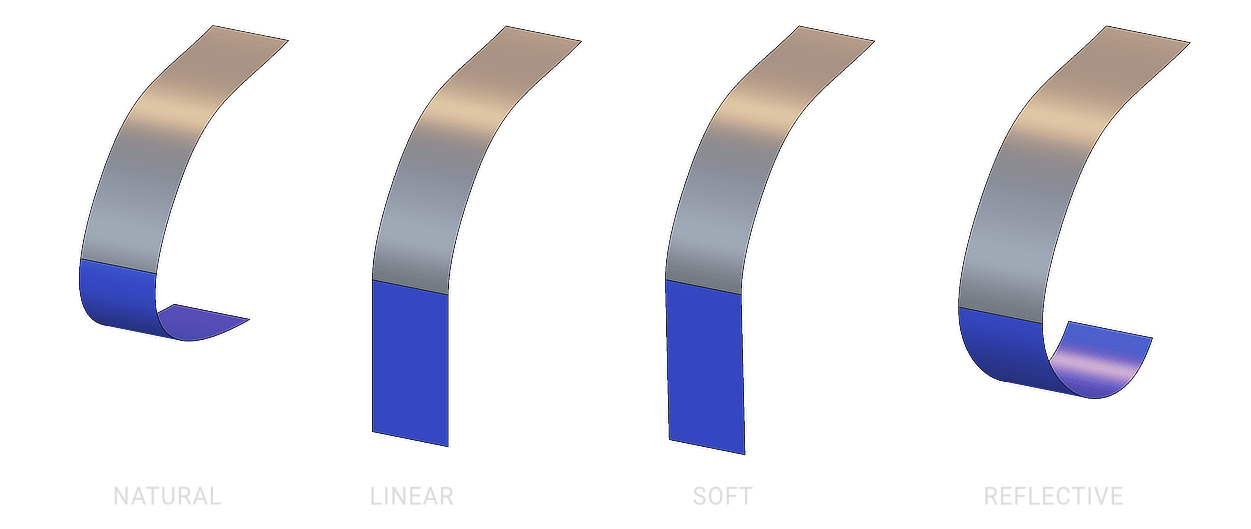
- Shape: Specify the shape of the extended surface. Options Natural, Linear, Soft, and Reflective will directly influence the shape and curvature of the extended surface during extrusion.
- Natural: Extends the surface by continuing the curvature described by the original surface near the boundary edge.
- Linear: Extends the surface in a straight line from the boundary edge, maintaining the tangent direction.
- Soft: Smoothly blends the extension with the existing surface, preserving both tangent and curvature continuity (G2).
- Reflective: Mirrors the surface curvature and tangency across the boundary, ideal for maintaining symmetry between surfaces.
- Limit: Controls how far the sheet extends toward a target body when intersecting it with another surface.
- Minimal: Extend the sheet to reach the target's outer boundary.
- Outside: Extend the sheet to reach the target's inner boundary.
- Inside: Extend the sheet to reach the target's outer boundary but if object is partly inside, the inside intersection will be ignored and only the outside part of the sheet will be affected.
- Distance: Specify the distance to extend.
- Modify: When enabled, the Sheet becomes a single Sheet.
- Shape: Specify the shape of the extended surface. Options Natural, Linear, Soft, and Reflective will directly influence the shape and curvature of the extended surface during extrusion.
-
Keyboard Shortcuts
- D Distance: Specify the offset distance.
- Tab Cycle: Toggle through different Shape options.
-
Command Dialog
- Confirm with OK in the Command Dialog or right-click.