Alternative Duplicate
CommandAlternative Duplicate
ShortcutAlt+D
Button In Command Palette
In Command PaletteAvailable in
IndieStudio
Description
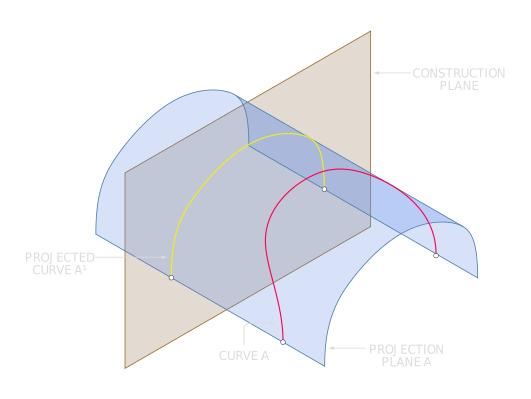
Project the curves onto the current construction plane along the normal direction, thereby generating a new Curve. The resulting projection flattens the original geometry onto the plane while preserving the curve's overall shape and continuity.
Basic Usage
- Set the desired construction plane for projection. See Construction Planes for more information.
- Select the Curves you want to project.
- Press Alt + D to execute the command.
- The projected Curves will be created on the current construction plane.
- Right-click or click OK in the Command Dialog to confirm.
Tip: After projection, you can reposition the resulting Curves using the Move Gizmo.