Create Curve Instance
 In Command Palette
Description
Create reusable duplicates of curves. An instance, similarly to instancing solid and sheet objects, stores transformation data (position, pivot point, rotation, and scale), color data and references the original curve. Any modification made to the master curve is instantly reflected in all of its instances.
Because curve instances are read-only copies of their source, they can't be edited independently. They also hide the CV (control-vertex) layout, which makes them visually distinct from the original curve.
- Use the Create Instance command on curves when you need many identical details that need to be consistent and symmetrical.
- Instances work with array commands such as Curve Array, Radial Array, and Rectangular Array.
- Instances can also be used with the Mirror command, enabling live symmetry where changes to the master geometry updates all mirrored instances automatically.
- Cannot use Place and Copy with Placement commands on created instances for now.
Basic Usage
- Select the Curve you want to use as the parent object..
- Open the Command Palette, type Create Instance, and execute the command.
- Move the newly created instance to the desired location.
- Confirm with OK in the Command Dialog or right-click.
Note: Once an instance has been created, you can duplicate that instance any number of times, and all of the duplicates will continue to reflect any changes made to the original parent object.
Instance Groups
The process of instancing groups is similar to instancing Curves.
When a group is selected and it contains primary sketches, an instance of the group will be created and placed outside of the group folder under its own dedicated category in the Outliner.
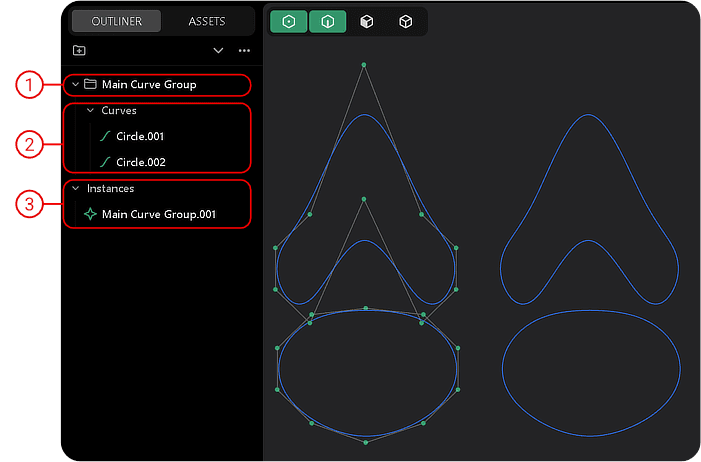
| Number | Description |
|---|---|
| 1 | Main group with components inside. |
| 2 | Parent objects that will be instanced. |
| 3 | Instance of main group allocated outside of the main group under the category "Instances". |
Basic Usage
- Select a Group in the Outliner to instantiate.
- Search for Create Instance in the Command Palette and execute it.
- Move the instanced group.
- Confirm with OK in the Command Dialog or right-click.