Offset Region
CommandOffset Curve
ShortcutO
Button In Suggested Commands Menu
In Suggested Commands MenuAvailable in
IndieStudio
Description
Offset the outline curves of a selected Region by specifying the distance to create new Regions. Multiple Regions create new Individual Regions or a combined Region.
Basic Usage
- Select the Region(s) you want to offset.
- Press O.
- Drag the yellow arrow to specify the distance.
- Set the options in the Command Dialog and Keyboard Shortcuts.
-
Command Dialog
- Distance: Specify the distance.
- Gap fill: Specify how the empty space is filled.
- Round: Rounds convex corners.
- Linear: Connects convex corners with straight lines, adding extra vertices.
- Natural: Preserves the original shape without adding extra vertices.
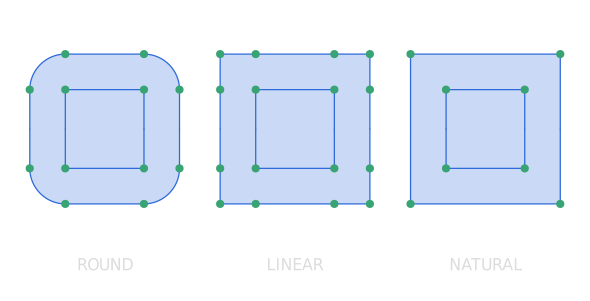
-
Keyboard Shortcuts
- S Lock distances: Offset with equal distance on both sides.
- I Individual: When multiple Regions are selected, turning on this option offsets the Regions in a combined form.
- V Gap fill: Cycle through the gap fill options.
- D Distance: Specify the distance with mouse movement.
-
Command Dialog
- Confirm with OK in the Command Dialog or right-click.