Extend Curve
CommandExtend Curve
Shortcut—
Button In Command Palette
In Command PaletteAvailable in
IndieStudio
Description
Extend a Curve by specifying the distance. Choose from extension shapes like Natural, Linear, Soft, Reflective, and Arc. You can now specify a target on curves and solids to match and intersect with precisely.
Basic Usage
- Select the end Point of the Curve you wish to extend.
- Use the Extend command in the Command Palette.
- Press D, move the cursor, and click at the endpoint.
- Set the options in the Command Dialog.
-
Command Dialog
-
Shape: Specify the shape of the extended curve. Options Natural, Linear, Soft, Reflective, and Arc will directly influence the shape and curvature of the extended curve during extrusion.
- Natural: Extends the curve "naturally" by continuing the curve described by the original curve just before the start of the extension.
- Linear: Extends the curve in a flat, straight line from the boundary point, maintaining the current tangent direction without altering curvature.
- Soft: Gradually blends the extension with the existing curve for a smooth transition, preserving both tangent and curvature.
- Reflective: Mirrors the curvature and tangency of the curve for a symmetrical and seamless continuation, ideal for maintaining curve symmetry.
- Arc: Extends the curve in a circular arc from the boundary point.
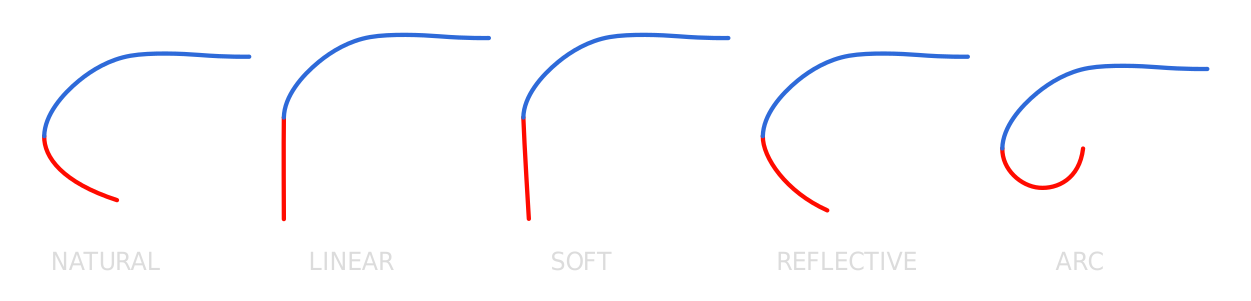
-
Distance: Specify the distance.
-
-
Command Dialog
- Confirm with OK in the Command Dialog or right-click.
Dependent Curve Extend
Extend a curve by matching and intersecting it with another curve or solid geometry, letting the target define the final extend distance.
- Select one of the endpoints of the curve you want to extend.
- Use the Extend command in the Command Palette.
- Select the target geometry to match and intersect with.
- Curves: Select a curve to match and intersect with.
- Solids: Select a sheet or solid object to match and intersect with.
- The curve extends precisely to meet the target geometry.