PolySplines
Description
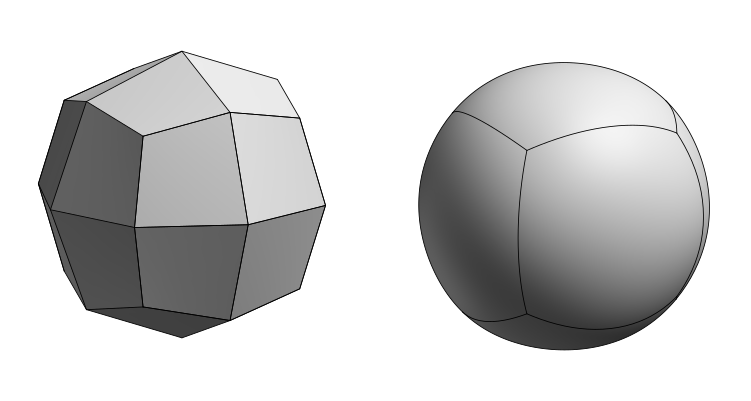
PolySplines converts a mesh object into a smooth untrimmed spline surface with G2 continuity, producing fewer and cleaner patches than traditional subdivision workflows.
Unlike Catmull-Clark subdivision, which refines a mesh through repeated approximating passes, PolySplines outputs B-Spline patches suitable for manufacturing and engineering use. Best results come from quad dominant meshes, though the algorithm handles triangles and n-gons as well.
PolySplines can be used in conjunction with the Blender Bridge addon, which includes live output updates and automatically imports results into your scene.
Note:
- PolySplines currently doesn't support Vertex and Edge Creasing and Bevelling applied in a DCC modeller. The current workaround is to manually insert edge loops to strengthen a corner or edge.
- Mesh formats such as .OBJ and .FBX are supported with PolySplines at the moment.
- CVs of PolySpline bodies can now be moved in Point Selection Mode. It is similar to moving the vertex points of a mesh body, but now possible on PolySpline geometry within Plasticity.
Basic Usage
-
Import the mesh or select it in the scene.
-
Open the Command Palette, search for PolySplines, and execute the command.
-
Adjust the options inside the command dialogue:
-
Command Dialog
- Rounded Corners: Rounds off the corners of an open body, whether or not thickness has been applied.
- Merge Patches: When enabled, adjacent patches are merged into a single surface with a clean CV layout, which is recommended for downstream modelling workflows. When disabled, surfaces remain as individual Bezier patches, each with their own independent CV structure.
- Interpolate Boundary Exactly: Forces the surface boundary to match the spline curve defined by the mesh boundary exactly, rather than approximating it. This is especially useful when joining two open bodies, ensuring their boundaries align perfectly for a clean merge.
-
Command Dialog
-
A spline object has been created.