Toggle Curve Curvature
 In Toolbar
Description
Measure the curvature of surface edges, curves, and isoparams using a curvature comb (displayed in white) to visually evaluate shape quality and smoothness.
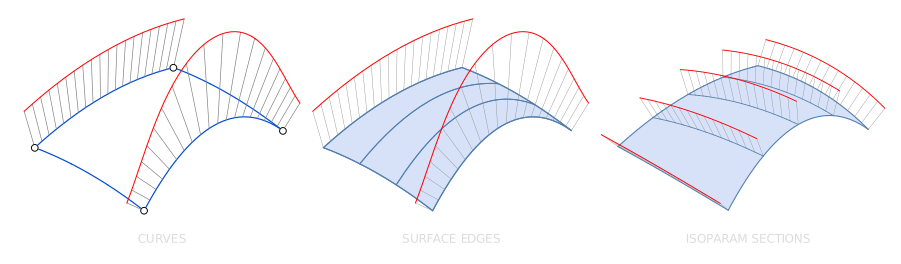
What is Curvature Evaluation?
Understanding Curvature
The Curvature Comb is a visual diagnostic tool used to inspect the smoothness of your edges and surfaces. It helps you find "flat spots" or "kinks" that aren't easily visible to the naked eye.
The Geometry of Curvature
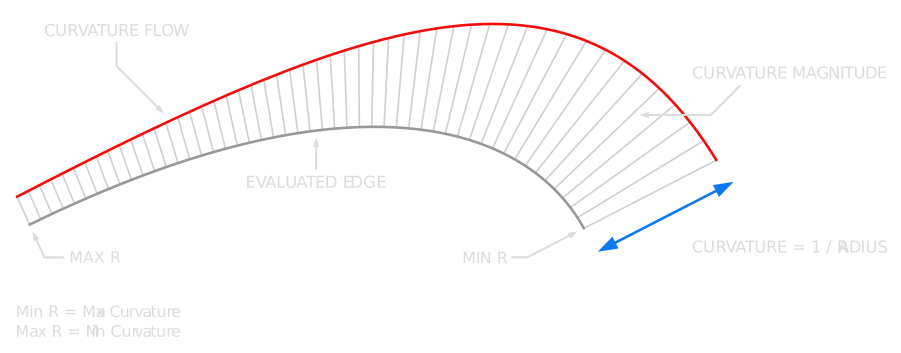
Curvature is defined as the mathematical inverse of the radius at any specific point on a curve. In Plasticity, this is represented visually:
-
Magnitude: The length of each comb line represents how sharply the curve is bending.
- Longer lines - indicate a tighter bend (smaller radius).
- Shorter lines - indicate a more gradual bend (larger radius).
- The Math: Curvature is the inverse of the radius:
-
Orientation: The direction of each line is always perpendicular (normal) to the curve at that point.
-
Curvature Flow: The red line (the boundary connecting the tips of the line) represents the rate of change in curvature. A smooth, continuous envelope indicates a high-quality curve.
Note: If a segment is perfectly linear (flat), no curvature comb will appear because the radius is infinite, resulting in a curvature of .
Evaluating Continuity
Evaluating Continuity
Use the curvature tool to assess the transition quality between surfaces or curves. These transitions are measured by continuity levels:
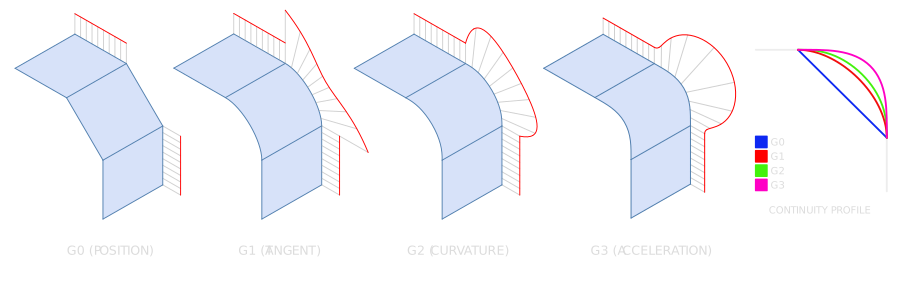
- G0 (Position): The curves touch, but there is a sharp "kink." The curvature comb will show a gap or a sudden break.
- G1 (Tangent): The transition is physically smooth to the touch. The curvature combs meet at the same point, but their lengths () may differ.
- G2 (Curvature): The transition is visually seamless. The curvature combs meet and have the exact same length, ensuring smooth reflections.
- G3 (Acceleration): The highest level of flow. Not only do the combs match, but the rate at which they change (the red envelope) also matches.
For a deep dive into these concepts, check out our Continuity Essentials guide.
Understanding Curvature Combs
Understanding Curvature Combs
The Curvature Comb acts as a visual map of a curve’s character. By observing how the comb lines vary along the path, you can diagnose the health and flow of your geometry.
How to Read the Plot
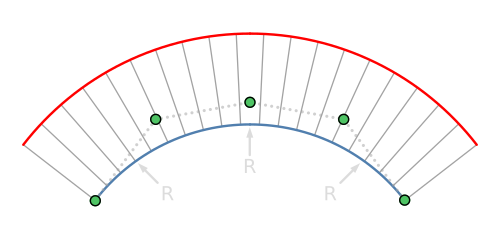
- Uniform Radius: When comb lines are of equal length, the curve has a constant radius indicating a perfect circular arc.
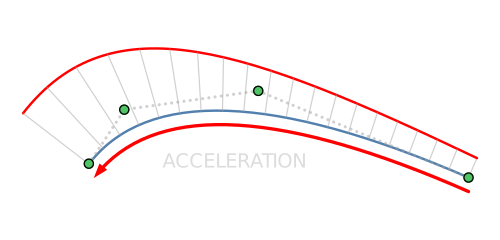
- Acceleration & Deceleration: A gradual change in line length indicates acceleration.
- Increasing length: The curve is tightening (the radius is getting smaller).
- Decreasing length: The curve is flattening out (the radius is getting larger).
- The Math: Curvature is the inverse of the radius:
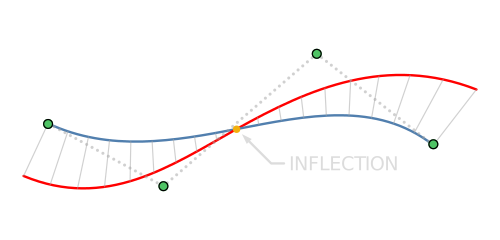
- Inflection Points: An inflection occurs at the exact moment the comb lines "flip" to the opposite side of the curve. This signals a transition from concave to convex (an "S-bend").
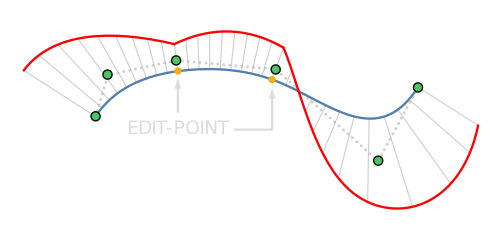
- Discrepancies and Breaks: A sudden jump or "break" in the comb lines indicates a curvature discrepancy.
- This usually occurs at Edit Points or where two separate curves meet.
- A break suggests that while the curves might touch (G0) or be tangent (G1), they do not share the same curvature (G2), which often results in irregular or rough highlights in your final render.
Basic Usage
- Select the curve you want to measure.
- Open the Command Palette (F), type Toggle Curvature, and run the command; or click the
 icon tool located in the Toolbar.
 - Adjust the curvature comb scale in the Curvature panel on the right:
-
Curvature Dialog
- Comb Scale: Adjusts the size of combs.
-
Curvature Dialog
- A new curvature measurement appears in the Outliner under Measurements.
Info
Curvature evaluation helps you:
- Ensure surface quality: Identify and remove ripples, dents, or unintended kinks to maintain smooth transitions.
- Verify continuity: Assess whether surfaces meet with G0 (position), G1 (tangent), G2 (curvature), or G3 (acceleration) continuity.
- Refine reflection flow: Assess whether surfaces appear seamless under various lighting conditions.
- Predict manufacturability: Sharp curvature changes can pose challenges in machining, molding, or fabrication.