Migration Guide: v26.1
Version 26.1 introduces changes to default keybindings, selection modes, and SpaceMouse input. This guide covers what's changed and how to adjust your workflow.
Keybinding Changes
Lock Distances (Tab > S)
The Tab key no longer toggles "Lock distances" (symmetric/equal distance on both sides). This has been reassigned to S by default in the following commands:
Sketch:
Solid:
Selection Mode Changes
All Selection Modes (Tab > 5)
Previously, pressing Tab enabled all selection modes at once. In 26.1, this has been reassigned to 5. The individual mode shortcuts remain unchanged:
| Selection Mode | Shortcut | Icon |
|---|---|---|
| Control Point | 1 |  |
| Edge | 2 |  |
| Face | 3 |  |
| Solid | 4 |  |
| All | 5 |     |
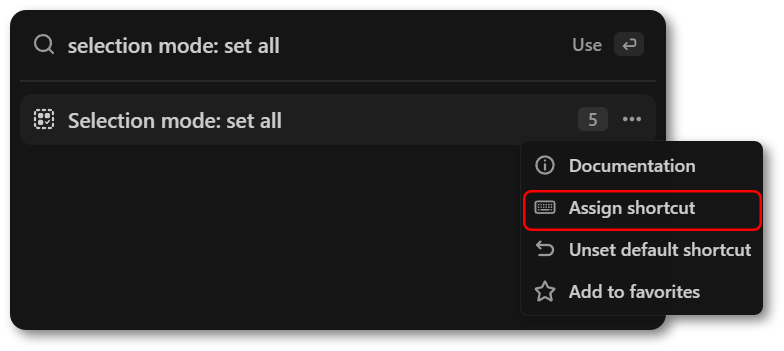
Pressing 5 does not cycle, it enables all selection modes simultaneously. If you prefer the old behavior, you can reassign this action back to Tab or any other key by opening the Command Palette with F, searching for Selection mode: set all, right-clicking, and assigning a new shortcut.
SpaceMouse Changes
SpaceMouse behavior has been improved to be more consistent with other 3D software. Updating to the latest driver for your device is recommended.
- Directions - Up/Down directions are now reversed.
- Speed - Default speed has been recalibrated to better match the expected feel in other applications.
- Lock Horizon - A new option in Preferences > SpaceMouse to toggle roll behavior.